
Approve each join
Approving a machine hands it its assignment. Nothing secret reaches it before that, and only over a channel pinned to its own key.
Approve
Section titled “Approve”Match the machine by the pairing code on its console.
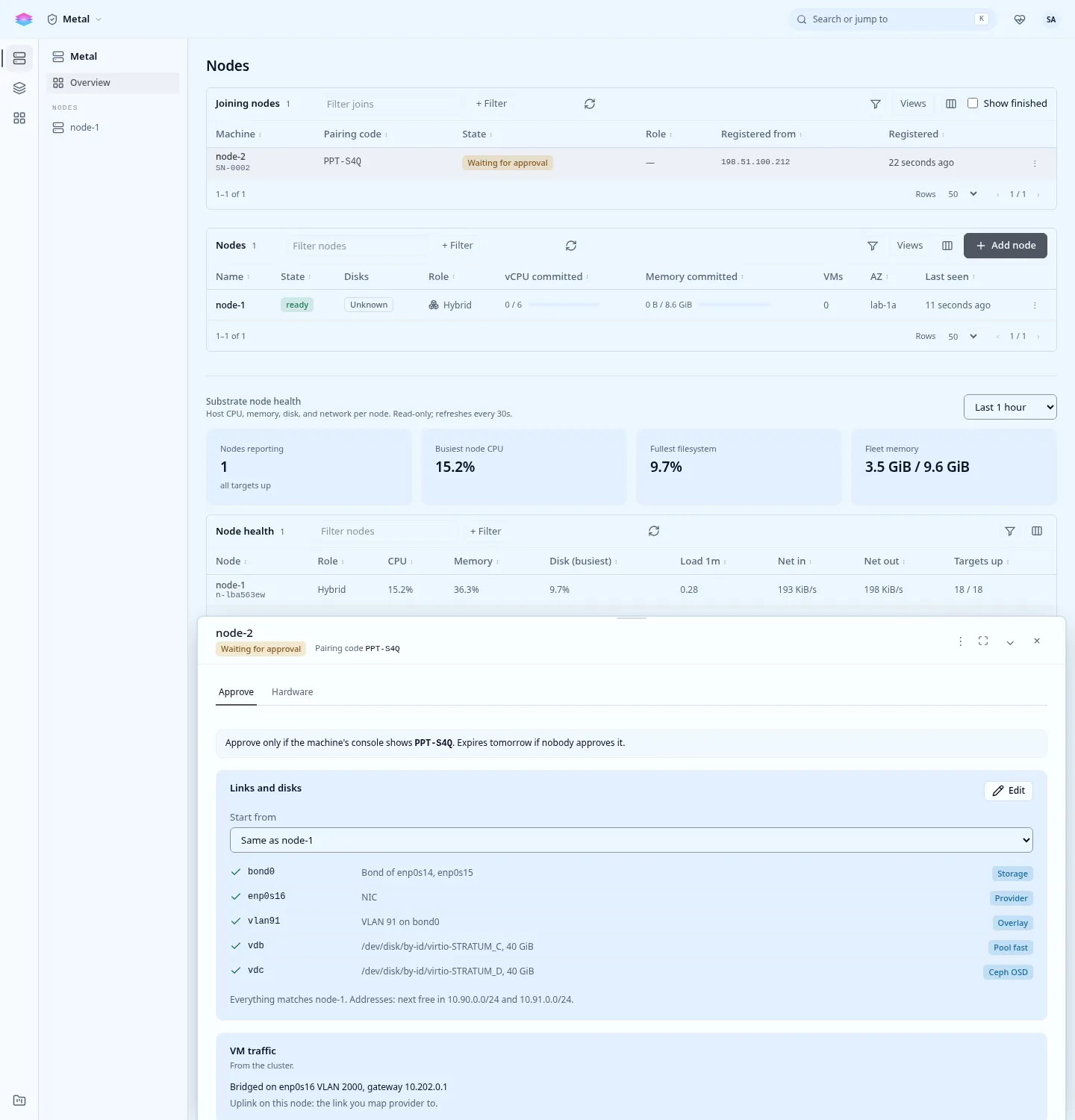
In Admin › Metal, Joining nodes, open the machine (Review and approve). The Hardware tab shows what it reported. The Approve tab leads with Same as the first node, the default when the machine has the same NICs and disks: it copies the first node’s links, NIC roles and disks. Edit to change any of it, then Approve and queue.
stratumctl admin nodes joins get nj-8w2k4m1p # its hardware: disks, NICsstratumctl admin nodes joins approve --pairing 4F7-K2Q --from n-4k2x9m1qstratumctl admin nodes joins approve nj-8w2k4m1p --rack r2 \ --disk /dev/disk/by-id/nvme-EXAMPLE_B=ceph-osdstratumctl admin nodes joins approve --serial SN0003 -f node-3.yamlName the machine by its join id, --serial or --pairing. See
joins approve. --from <node> copies
the assignment of a node that joined, or of a member with a hardware plan such as the
first node: links whose NICs exist on this machine, and disks matched by model
and size. What did not match is printed. Addresses are never copied.
What the assignment holds
Section titled “What the assignment holds”| Setting | Default |
|---|---|
| Name | The host name. |
| Role | hybrid (control plane and instances) while the cluster has fewer than its planned control-plane nodes, then hypervisor. |
| Rack | None. A rack is declared on every node or on none. |
| Availability zone | None. If set, it is the region plus one lowercase letter, for example local-1a. |
| Management NIC | The NIC and address the machine registered from. |
| NIC roles | Storage, overlay, VM traffic or unused, as links: NICs, bonds and VLANs. |
| Disks | Each disk a role: compute pool (with a pool name and storage class), ceph-osd or unused. |
| Addresses | From the cluster. |
| NTP servers | The first node’s. |
- Disks. A disk that holds data needs a typed confirmation (
--confirm KEY, or typing its name in the console). The system disk cannot be assigned. With the whole-disk OS layout the machine needs acomputedisk or aceph-osddisk. - Addresses. A link that carries storage or overlay and names no address gets the next free host address of that network, and the network’s MTU. A full network is refused.
- Never asked. The region, parent domain, upstream DNS, service addresses, the first admin and the cluster’s secrets come from the cluster.
- Control-plane count. An approval that would leave an even number of
control-plane nodes beyond the planned size is refused: approve it as
hypervisor. At most 5 vote. Approve the third node straight after the second.
The approval is checked against the machine’s own hardware and refused with every reason: an unknown NIC or disk, a disk with data and no confirmation, a rack or network the other nodes do not declare, an address another node has.
For a file (-f), the assignment is YAML or JSON:
name: node-3role: hybridrack: r3links: - {name: storage, interface: enp2s0f0, purposes: [storage]}disks: - {key: /dev/disk/by-id/nvme-EXAMPLE_B, role: ceph-osd}It joins, one at a time
Section titled “It joins, one at a time”Approved machines join in approval order, one at a time. A join starts only when the cluster is READY, no node is joining or being removed, no upgrade runs, and every node has applied the current membership. A queued join says what it waits for.
stratumctl admin nodes joins liststratumctl admin nodes joins watch nj-8w2k4m1pThe node brings up its links (bonds, VLANs), installs the platform and joins the Postgres, OpenBao and OVN clusters. The step Joining Postgres (Patroni) ends when its Postgres streams from the primary. It is joined once the node is an active member and every node has applied it.
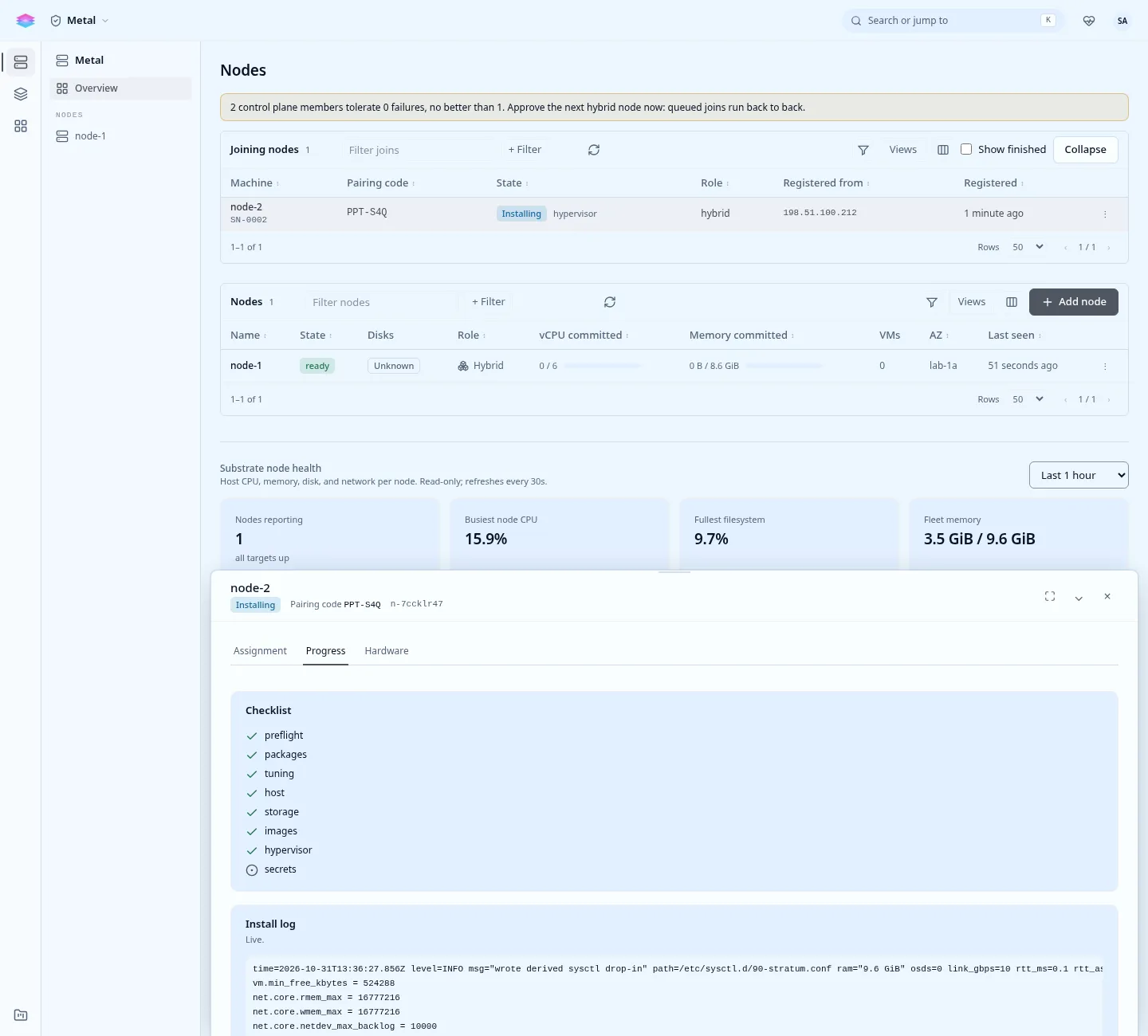
- Failed. The failed step is named by its title (for example Joining the
OVN raft) in the list and the drawer, with the error, and the node is taken
back out of every cluster it reached. Fix the cause and
stratumctl admin nodes joins retry <id>. - Silent for 10 minutes shows as stalled.
- Reject (
stratumctl admin nodes joins reject <id> --reason "...") ends a registration. Create a new join code and give it to the machine withstratum-installer join; it registers anew without a reinstall.
Approve the next machine, then check readiness.